 In an upcoming article in Cyberpsychology, Behavior, and Social Networking, Lee and Jeong1 explore behavioral antecedents of social mentoring networks, which are defined as informal mentoring that occurs primarily through an social networking website (like Facebook). They identify the Theory of Planned Behavior, which posits that human behavior is the result of reasoned consideration of advantages and disadvantages to various activities, as the primary explanatory framework for involvement in social mentoring. They also proposed two new antecedents: attitudes toward online social network mentoring and willingness to share personal information in such a setting. They found general support for the Theory of Planned Behavior and their two new antecedents for predicting behavioral intentions, but not actual behavior.
To test this, the researchers asked 969 current users of social mentoring networks to complete two surveys, two weeks apart. In the first survey, researchers collected information about proposed behavioral antecedents (those proposed by the Theory of Planned Behavior (attitudes, subjective norms, and perceived behavioral control) plus their own proposed additions (attitudes towards social mentoring networks and willingness to disclose personal information on such a network). In the second survey, they captured a self-report of social network behavioral intentions related to mentoring (e.g. “I intend to participate in SMN at least once per day in the next 2 weeks”) as well as actual behavior. 469 (48%) responded to the first survey, whereas 414 (43%) responded to the second. The researchers then excluded 38 “insincere responses” – this was never explained further. The final sample was thus 376.
Although confirmatory factor analysis would have been more appropriate, an exploratory factor analysis was first used to confirm the factor structure of the six scales used. This was successful. Each scale used exhibited acceptable internal consistency reliability (α > .70). Behavioral intentions were regressed hierarchically on the Theory of Planned Behavior variables in Step 1, adding the two new variables in Step 2. 30% of variance in behavioral intentions was explained with the theory of planned behavior, whereas the two new variables explained an additional 6% beyond this. This provides some support for these new variables as contributing factors in behavioral intentions for online mentoring.
Perceived behavioral control did not predict intentions in either model, which was surprising. However, this may be because it is correlated with other variables described by the Theory of Planned Behavior – a correlation matrix was not reported, so there is no way to know.
The researchers also replicated their analyses using behaviors, but found no interesting relationships or hierarchical prediction after controlling for intentions. This implies that all of these behavioral antecedents affect behavior through the mediating effect on behavioral intentions. Unfortunately, the researchers did not actually test this directly (for example, with a structural equations model).
Overall, this article suggests that the Theory of Planned Behavior applies in the online social mentoring context – no surprises here. Attitudes towards social mentoring also appear to be an important component. But I think the most interesting part of this is the willingness to disclose angle – if people are unwilling to share information about themselves on these sites, they seem less likely to participate in them generally. And if that’s true, I suspect they are less likely to benefit. In that sense, online social network-based mentoring may only be useful at a two-way street – with both the mentor and mentee sharing freely.
However, it’s also possible that a “third variable” is causing both – for example, overall less motivated people are less likely to both report behavioral intentions and have poorer attitudes towards mentoring in general. Future research should compare reactions and intentions regarding both in-person and online programs simultaneously to identify any meaningful differences in how people approach the two.
- Lee, D., & Jeong, B. (2012). An examination of behavioral antecedents to individuals’ participation in a social mentoring network from a protégé’s perspective Cyberpsychology, Behavior, and Social Networking DOI: 10.1089/cyber.2012.0035 [↩]
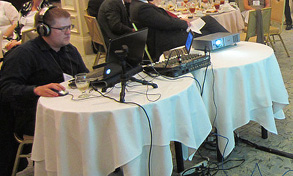 Last week, I spent most of my week in final preparation for and then running the live broadcast of the SIOP Leading Edge Consortium 2012 on Environmental Sustainability at Work in New Orleans. This was a bit experimental – SIOP had never done this before, nor had I. But the LEC leadership team wanted to increase the reach of the conference to those that would otherwise be unable to participate. This effort was apropos given the topic of the conference; by serving virtual attendees, we reduced the carbon footprint of the conference while simultaneously increasing its message. I learned a great many lessons in putting this together, which I thought I would share for those facing similar challenges.
Costs and Equipment
The LEC committee decided early on that we would stream exclusively to remote hosts, not to individuals’ computers. This was done to provide some control over the participant experience – at each remote location, a local facilitator would manage the traditional flow of conference activities, including lunch, breaks, etc. This was also beneficial cost-wise because we had over 100 virtual participants but only about a dozen local sites; most streaming sites (Livestream included) set pricing tiers in part based upon the number of anticipated viewers. With 12 remote sites, 3 observation/testing sites, and about 8.5 hours of video (+20% for testing and unanticipated overhead), we only needed 153 viewer hours, well within the lowest price tier for Livestream ($350 at the time; we set up this premium account a couple of weeks ahead of the conference so that the month of access we’d gain would overlap the conference sufficiently to allow time to test pre-conference and to download archived footage post-conference).
Because we wanted to shoot in HD, we also needed to purchase equipment: a Logitech HD Pro Webcam C920

That brought the total technology cost for Livestreaming our conference to about $450.
As for other equipment, I already had other necessary items – a laptop, a cooling pad (important), and ear-cup headphones (i.e. noise canceling, or at least designed such that external noises are very muffled while wearing them). If you don’t have these items, this would obviously cost you a bit more.
Pre-Conference Planning
Since we were working with remote sites, we needed to invite those sites well ahead of the conference. My only advice here is that if you plan to involve remote sites, work with them well in advance. As the person tapped to organize a virtual conference, you are probably checking your e-mail continuously. Remote site facilitators are much less likely to share your enthusiasm. Even a single request for information could take a couple of weeks to be fulfilled. Critically, we also needed local copies of the presenters’ PowerPoint presentations to broadcast them in maximum quality – the last presentation was delivered less than an hour before that presentation began.
Camera Setup
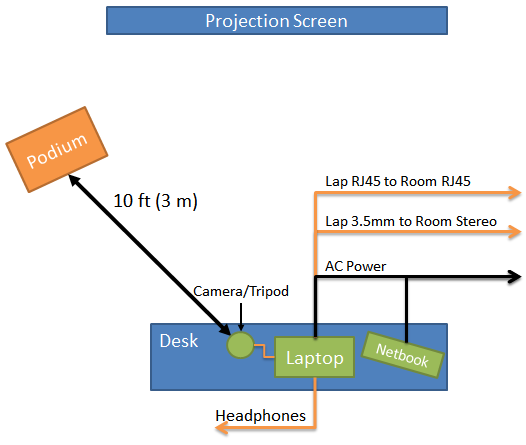
The evening before the conference, I set up my equipment in the conference room as seen in the diagram above. First, I set up the broadcasting laptop and cooling pad connected to the webcam and tripod. Because webcams don’t have optical zoom, you’ll need to be within 10-15 feet (3-4 meters) of the speaker in order to get a fair amount of detail (this generally means the first row of seats/tables). Next, I ran three cables – power to the wall, Ethernet (I would not trust wireless Internet access for a live broadcast) to the wall, and an audio cable to the room’s stereo mix out (i.e. whatever the room hears on the audio system should be fed into your computer’s microphone/line-in port). This will mean some conversion; typically, the room is on a microphone cable (called XLR) whereas your computer will need a 3.5mm mini-stereo plug. Such converters are generally cheap, but you’ll need to have them (or, as in our case, you’ll need to get them from the local AV folks). Finally, I plugged in my headphones.
Questions from Virtual Sites
You might have noticed an unaccounted-for netbook in the diagram above. This was because we wanted to take questions from the audience at the virtual sites. We did so with Twitter (using a hashtag) and via e-mail. A group of graduate students in my lab back at ODU were standing by monitoring these sources and feeding me the questions via Google Talk, which was open on the netbook (which was connected via wi-fi). A second team relaying questions is strongly recommended. Not only do they filter questions for you, but they also can monitor feed quality. You probably won’t have enough time to keep track of questions from multiple sources while also keeping the camera aimed, so this team keeps the multitasking pressure lower. I also kept a live feed open on the netbook so that I could watch for fluctuations in feed quality and skips.
Streaming Software
If you’re using Livestream.com, I’d recommend the Procaster software which can be downloaded for free from Livestream. This allows you to switch between “screen” view (a capture of a portion of your screen – I used this to record a local copy of the presenter’s PowerPoint), “camera” view (the live camera feed), and various mixed feeds combining the two. I recommend the “3D Mix” which records a small portion of the camera view (enough to capture the presenter) plus a larger version of the screen view (so that the PowerPoint appears large and crisp). To increase professionalism, I also recommend switching feeds such that the people watching can’t see you transition between PowerPoints. For example, between presentations, I would switch to “camera” view to focus on the presenter while behind-the-scenes I would swap out the PowerPoints before returning to 3D Mix.
The only problem with this setup is video – since your audio is coming from the room, if any presenters use embedded video in their PowerPoints, you’ll need to switch to screen mode and pivot the camera to look at the projection screen or the audio won’t sync. The only way to avoid this is to get a live feed from the presenter’s computer and then re-broadcast that (usually not possible). You may also need to modify the camera’s video settings manually when changing from a speaker (generally fairly dark) to a projected image (extremely bright). Logitech’s built-in camera tools accomplish this nicely, which you can run in tandem with Procaster.
What to Broadcast When Not Broadcasting
I would strongly recommend creating an “on a break” PowerPoint slide and recording a short loop of video containing this slide (maybe 30 seconds). Then, using Livestream Studio, cue this on autopilot. This way, any time the feed cuts out, viewers will automatically be redirected to the an official-looking pause slide. There is also an “automatically add to auto-pilot” option in Procaster that you probably don’t want to turn on – otherwise, everything you record automatically re-appears in the live feed.
Running Procaster
Once the hardware is set up, there’s a multi-step process to get Procaster running appropriately:
First time:
- Open the preferences and go through every menu. Every single item on here is potentially important, so take your time and think about every one (this is how I noticed the “automatically add to auto-pilot” option). I’d recommend hiding the mouse from the live feed.
- Select a recording quality that is appropriate given your computer and anticipated Internet connection. I’d recommend against using any of the quality presets, because your laptop probably can’t handle them – you’ll want as much processor power devoted to a single high quality stream as possible. Set your audio quality to at least 160kbps and the video quality pretty high (I used 1000 kbps) and test it (see if you can keep the processor usage consistently under 50% or so while swinging the camera around and playing music). Adjust up and down and test again until you can get it in the right area.
Every time:
- Open all the PowerPoints you’ll need before opening Procaster.
- Open Procaster and click “Go Live”.
- Open any camera setting programs and set as appropriate (if using the recommend webcam above, I recommend turning off auto-focus and going to “full landscape”, and also turning off auto-gain/auto-exposure after the camera initially adjusts to the light level of the room).
- Drag the capture rectangle over PowerPoint.
- Open the audio mixer and enable the headphone monitor (so that you can listen to your stream). Adjust audio feeds until the mix sounds good. Close the audio mixer unless you’ll have multiple speakers.
- Monitor the feed to ensure the camera stays targeted and keep the headphones on to ensure the audio sounds right.
Lessons Learned
Even if you set up everything correctly, you’ll be doing a lot of multi-tasking – monitoring the video feed, listening to the audio feed, relaying questions, aiming the camera, mixing the audio, and adjusting camera quality. Anything you can do to delegate responsibility, do that.
Working closely with the on-site AV people is critical. They control the quality of sound output in the room, and by extension, the quality of sound in your feed. If they manage levels appropriately, you won’t need to adjust the mixer mid-presentation (one less thing to worry about). Nice AV people will also provide all your converters (we ended up needing some special equipment – a mixer – to get from the room’s stereo mix back to my computer – you can see it in the photo at the top of this page).
Livestreaming is processor intensive. I’d originally planned to broadcast in full HD (1080p; blu-ray quality), but this spiked my processor usage to 100% and my computer simply could not keep up without dropping frames and audio cut-outs. If you’re using a laptop, even with a fast processor, you probably can’t get above DVD quality in a live feed while keeping your processor at a reasonable level (<50%). Although not super-crisp, this still looked decent according to reports at remote sites (the biggest concern was that the slide text was not blurry on a projected screen). With a sufficiently powerful desktop and a proper cooling system, you can do better – but it seems unlikely most conference organizers would want to set up a desktop computer at a conference site (especially in a multi-room configuration).
One of things that surprised me the most was psychological: speakers don’t really know who to look at when a virtual participant asks a question. Usually, they just stared at me, as if they were trying to convince me personally of their response to the point that I had relayed. That’s neither good nor bad, but it might be a little unnerving if you don’t expect it.
Summary
Running a virtual conference is a big task with many working parts. It is easy to get overwhelmed. But if you carefully map out all the tasks involved and the requirements for those tasks, it’s quite doable, even with a small budget. With these guidelines and a little work, you should be able to take any in-person conference and add a virtual audience.
In a recent article in Cyberpsychology, Behavior and Social Networking, Lee, Lee and Choi1 investigate why people are attracted to online social games. They identify 6 dimensions describing motivation to play such games: social interaction, self-presentation, fantasy/role playing, passing time/escapism, entertainment, and challenge/competition. Interestingly, social gamers do not report that they play such games to be social with others, and the primary reasons that non-gamers report avoiding such games is because they find social media notifications annoying and the games to be poor quality. So wheras we now better understand why people don’t play online social games, we are not much closer to understanding why they do play them.
To make the conclusions they did, the authors created 36 items in eight categories based upon a literature review and a small-scale qualitative study conducted on Facebook. They then asked these questions to 324 college students via an online survey. Using factor analysis, they then identified 6 factors among these items. These were not equally endorsed, however. From most common to least common, participants rated the dimensions at these mean levels (items within the scale follow):
- Passing time/escapism (Mean = 4.58 out of 7)
Because playing it gives me something to occupy my time
When I have nothing better to do
When I am bored
Because playing it passes the time away
So I can get away from what I am doing
So I can forget about school, work or other things - Entertainment (Mean = 4.01 out of 7)
Because playing it amuses me
Because playing it is enjoyable
Because playing it entertains me
Because playing it is exciting
Because playing it is thrilling - Challenge/competition (Mean = 3.11 out of 7)
Because I enjoy competing with other players
To complete a level or win the game
Because I find it very rewarding to get to the next level
To prove to my friends that I am the best - Fantasy/role-playing (Mean = 2.18 out of 7)
Because playing it allows me to pretend I am someone/somewhere else
Because I enjoy the excitement of assuming an alter ego in this game
Because I enjoy trying out new roles and personalities with my character
Because I like to do something that I could not normally do in real life through this game.
Because I enjoy being immersed in a fantasy world
Because I enjoy role-playing my character - Self-presentation (Mean = 1.98 out of 7)
Because I want other players to perceive me as competent
Because I want other players to perceive me as socially desirable
Because I want other players to perceive me as likable
Because I want other players to perceive me as friendly
Because I want other players to perceive me as skilled
To make a good impression
To tell others a little bit about myself - Social interaction (Mean = 1.62 out of 7)
To get support from others
To find people like me
To find something to talk about
To feel important
To feel like I belong to a group
To maintain a relationship I value
To find new people
Because I wonder what other people said
The “entertainment” label strikes me as a little strange. Based upon the item content, I’d call it something like “affect” – I suspect respondents answering positively in this dimension would also endorse: “I play games because playing games makes me feel good.”
In any case, this breakdown and associated means have some compelling implications for social game design. The top reason for playing games is escapism and boredom, but on average, participants only rated this barely above “neither agree or disagree” as to the reason they play games. Entertainment rated near-neutral, and other categories were endorsed much less often. At the bottom end, participants on average strongly disagreed with the idea that they played games to interact with others. In other words: people don’t play social games to be social.
Instead, the only motivational social component to social games appears to be the method used to share them. Social games become popular through viral sharing; but interestingly, an overabundance of notifications is also the number one reason given by participants not to play online social games (23% of respondents; followed by “poor game quality” at 16%).
The primary limitation of this study? Because none of the dimensions were endorsed very strongly, it’s not clear that it actually comprehensively captures motivation to play online social games. Since only game players were given this survey, they must play for some reason. Analyses were not conducted to ensure that every participant rated at least one dimension strongly, which is a critical limitation to the use of this scale in future research.
- Lee, J., Lee, M., & Choi, I.H. (2012). Social network games uncovered: Motivations and their attitudinal and behavioral outcomes Cyberpsychology, Behavior, and Social Networking, 15 (12), 1-6 DOI: 10.1089/cyber.2012.0093 [↩]